Author your first template
This guide will show you how to create your first template using PDFerret.
Start creating your template
To create a template, you need to go to the Templates view, and click on the Create Template button.
After this, you will be redirected to the template editor, where you can make your template. The template editor has two panes:
- The left pane is the template editor, where you can create your template.
- The right pane is the preview pane, where you can see how your template will look like.
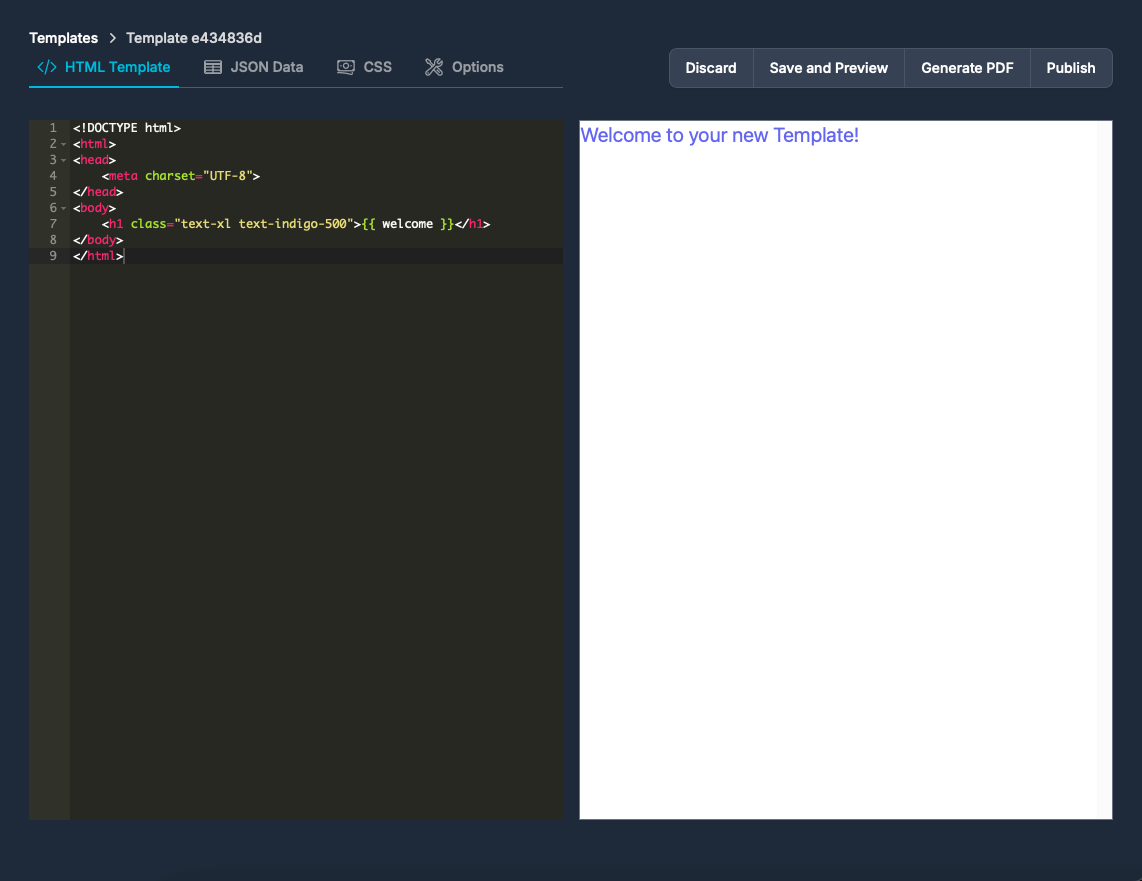
The template editor has four main sections:
- HTML Template: This is where you can write the HTML code for your template.
- JSON Data: This is where you can write the JSON data that will be used to fill the template.
- CSS: This is where you can write the CSS code for your template.
- Options: This is where you can set the options for your template (learn more about this here).
For this example, we'll be creating a simple invoice.
Define the HTML template
Paste the following code in the HTML Template code editor:
<!DOCTYPE html>
<html lang="en">
<head>
    <meta charset="UTF-8">
    <meta name="viewport" content="width=device-width, initial-scale=1.0">
    <title>Invoice</title>
</head>
<body class="bg-gray-100">

<div class="max-w-4xl mx-auto p-6 bg-white shadow-md rounded-lg mt-8">
    <!-- Header -->
    <div class="flex justify-between items-center mb-8">
        <div>
            <h1 class="text-4xl font-bold text-gray-800">Invoice</h1>
            <p class="text-sm text-gray-500">Invoice #: 001</p>
        </div>
        <div class="text-right">
            <h2 class="text-lg font-semibold">Your Company</h2>
            <p class="text-sm">123 Business Road, Suite 100</p>
            <p class="text-sm">City, State, ZIP</p>
            <p class="text-sm">email@example.com</p>
        </div>
    </div>

    <!-- Billing Details -->
    <div class="grid grid-cols-2 gap-4 mb-8">
        <div>
            <h3 class="text-md font-semibold text-gray-800">Billed To:</h3>
            <p class="text-sm">Client Name</p>
            <p class="text-sm">123 Client Address</p>
            <p class="text-sm">City, State, ZIP</p>
            <p class="text-sm">client@example.com</p>
        </div>
        <div class="text-right">
            <h3 class="text-md font-semibold text-gray-800">Invoice Date:</h3>
            <p class="text-sm">October 10, 2024</p>
            <h3 class="text-md font-semibold text-gray-800 mt-4">Due Date:</h3>
            <p class="text-sm">October 24, 2024</p>
        </div>
    </div>

    <!-- Table of Items -->
    <div class="mb-8">
        <table class="min-w-full table-auto">
            <thead class="bg-gray-200">
                <tr>
                    <th class="px-4 py-2 text-left text-sm font-semibold text-gray-600">Description</th>
                    <th class="px-4 py-2 text-right text-sm font-semibold text-gray-600">Quantity</th>
                    <th class="px-4 py-2 text-right text-sm font-semibold text-gray-600">Unit Price</th>
                    <th class="px-4 py-2 text-right text-sm font-semibold text-gray-600">Amount</th>
                </tr>
            </thead>
            <tbody>
                <tr>
                    <td class="border-t px-4 py-2 text-sm text-gray-700">Service/Product 1</td>
                    <td class="border-t px-4 py-2 text-right text-sm text-gray-700">2</td>
                    <td class="border-t px-4 py-2 text-right text-sm text-gray-700">$50.00</td>
                    <td class="border-t px-4 py-2 text-right text-sm text-gray-700">$100.00</td>
                </tr>
                <tr>
                    <td class="border-t px-4 py-2 text-sm text-gray-700">Service/Product 2</td>
                    <td class="border-t px-4 py-2 text-right text-sm text-gray-700">1</td>
                    <td class="border-t px-4 py-2 text-right text-sm text-gray-700">$200.00</td>
                    <td class="border-t px-4 py-2 text-right text-sm text-gray-700">$200.00</td>
                </tr>
            </tbody>
        </table>
    </div>

    <!-- Summary -->
    <div class="flex justify-between items-center">
        <div></div>
        <div class="w-1/3 text-right">
            <div class="flex justify-between">
                <p class="text-sm text-gray-600">Subtotal:</p>
                <p class="text-sm text-gray-800">$300.00</p>
            </div>
            <div class="flex justify-between mt-2">
                <p class="text-sm text-gray-600">Tax (10%):</p>
                <p class="text-sm text-gray-800">$30.00</p>
            </div>
            <div class="flex justify-between mt-2">
                <p class="text-sm text-gray-600 font-semibold">Total:</p>
                <p class="text-sm text-gray-800 font-semibold">$330.00</p>
            </div>
        </div>
    </div>

    <!-- Footer -->
    <div class="mt-8 text-center text-gray-500 text-sm">
        <p>Thank you for your business!</p>
        <p>If you have any questions concerning this invoice, contact us at email@example.com.</p>
    </div>
</div>

</body>
</html>
Click on the Save and Preview button, and you will see the preview of the template:
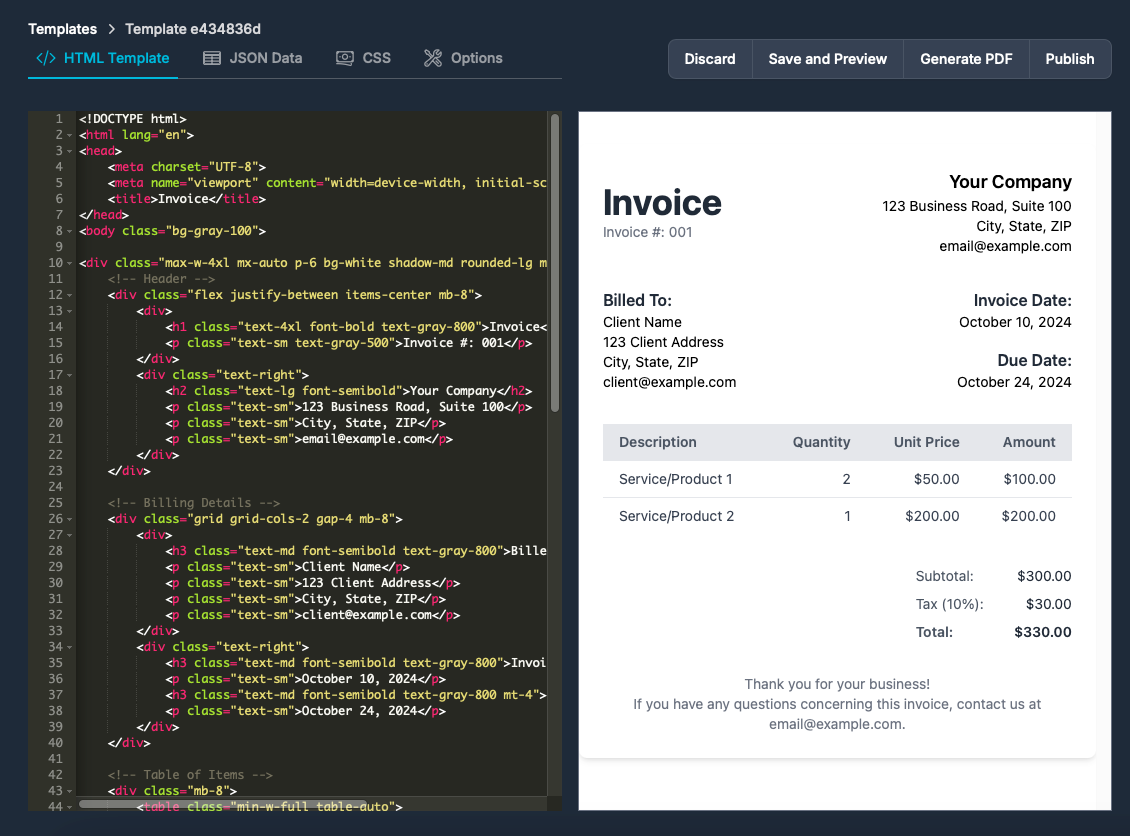
Now, we will fill this template with dynamic data, so we need to define the JSON data.
Define the JSON data
Paste the following code in the JSON Data code editor:
{
  "invoice": {
    "number": "001",
    "date": "October 10, 2024",
    "due_date": "October 24, 2024",
    "items": [
      {
        "description": "Service/Product 1",
        "quantity": 2,
        "unit_price": 50.00,
        "amount": 100.00
      },
      {
        "description": "Service/Product 2",
        "quantity": 1,
        "unit_price": 200.00,
        "amount": 200.00
      }
    ],
    "subtotal": 300.00,
    "tax_rate": 10,
    "tax": 30.00,
    "total": 330.00
  },
  "company": {
    "name": "Your Company",
    "address": "123 Business Road, Suite 100",
    "city_state_zip": "City, State, ZIP",
    "email": "email@example.com"
  },
  "client": {
    "name": "Client Name",
    "address": "123 Client Address",
    "city_state_zip": "City, State, ZIP",
    "email": "client@example.com"
  }
}
And now replace the corresponding fields in the HTML template with the JSON data. For example, replace Invoice #: 001 with Invoice #: {{ invoice.number }}. It should end up looking like this:
<!DOCTYPE html>
<html lang="en">
<head>
    <meta charset="UTF-8">
    <meta name="viewport" content="width=device-width, initial-scale=1.0">
    <title>Invoice</title>
</head>
<body class="bg-gray-100">

<div class="max-w-4xl mx-auto p-6 bg-white shadow-md rounded-lg mt-8">
    <!-- Header -->
    <div class="flex justify-between items-center mb-8">
        <div>
            <h1 class="text-4xl font-bold text-gray-800">Invoice</h1>
            <p class="text-sm text-gray-500">Invoice #: {{ invoice.number }}</p>
        </div>
        <div class="text-right">
            <h2 class="text-lg font-semibold">{{ company.name }}</h2>
            <p class="text-sm">{{ company.address }}</p>
            <p class="text-sm">{{ company.city_state_zip }}</p>
            <p class="text-sm">{{ company.email }}</p>
        </div>
    </div>

    <!-- Billing Details -->
    <div class="grid grid-cols-2 gap-4 mb-8">
        <div>
            <h3 class="text-md font-semibold text-gray-800">Billed To:</h3>
            <p class="text-sm">{{ client.name }}</p>
            <p class="text-sm">{{ client.address }}</p>
            <p class="text-sm">{{ client.city_state_zip }}</p>
            <p class="text-sm">{{ client.email }}</p>
        </div>
        <div class="text-right">
            <h3 class="text-md font-semibold text-gray-800">Invoice Date:</h3>
            <p class="text-sm">{{ invoice.date }}</p>
            <h3 class="text-md font-semibold text-gray-800 mt-4">Due Date:</h3>
            <p class="text-sm">{{ invoice.due_date }}</p>
        </div>
    </div>

    <!-- Table of Items -->
    <div class="mb-8">
        <table class="min-w-full table-auto">
            <thead class="bg-gray-200">
                <tr>
                    <th class="px-4 py-2 text-left text-sm font-semibold text-gray-600">Description</th>
                    <th class="px-4 py-2 text-right text-sm font-semibold text-gray-600">Quantity</th>
                    <th class="px-4 py-2 text-right text-sm font-semibold text-gray-600">Unit Price</th>
                    <th class="px-4 py-2 text-right text-sm font-semibold text-gray-600">Amount</th>
                </tr>
            </thead>
            <tbody>
                {% for item in invoice.items %}
                <tr>
                    <td class="border-t px-4 py-2 text-sm text-gray-700">{{ item.description }}</td>
                    <td class="border-t px-4 py-2 text-right text-sm text-gray-700">{{ item.quantity }}</td>
                    <td class="border-t px-4 py-2 text-right text-sm text-gray-700">{{ item.unit_price | number_format(2) }}</td>
                    <td class="border-t px-4 py-2 text-right text-sm text-gray-700">{{ item.amount | number_format(2) }}</td>
                </tr>
                {% endfor %}
            </tbody>
        </table>
    </div>

    <!-- Summary -->
    <div class="flex justify-between items-center">
        <div></div>
        <div class="w-1/3 text-right">
            <div class="flex justify-between">
                <p class="text-sm text-gray-600">Subtotal:</p>
                <p class="text-sm text-gray-800">{{ invoice.subtotal | number_format(2) }}</p>
            </div>
            <div class="flex justify-between mt-2">
                <p class="text-sm text-gray-600">Tax ({{ invoice.tax_rate }}%):</p>
                <p class="text-sm text-gray-800">{{ invoice.tax | number_format(2) }}</p>
            </div>
            <div class="flex justify-between mt-2">
                <p class="text-sm text-gray-600 font-semibold">Total:</p>
                <p class="text-sm text-gray-800 font-semibold">{{ invoice.total | number_format(2) }}</p>
            </div>
        </div>
    </div>

    <!-- Footer -->
    <div class="mt-8 text-center text-gray-500 text-sm">
        <p>Thank you for your business!</p>
        <p>If you have any questions concerning this invoice, contact us at {{ company.email }}.</p>
    </div>
</div>

</body>
</html>
Now, you can click on the Save and Preview button, and you will see the preview of the template filled with the JSON data. After this, you can click on the Publish button to make this version available for use through the API.